精确的罗盘航向: 基于C++, Python, and MATLAB的磁力计标定
In my last article: Navigating with Magnetometers: Electronic Compass Headings in C++, Python, and MATLAB, we learned how to calculate compass headings by measuring the Earth's magnetic field with a magnetometer. We also learned that magnetometer readings can be distorted by nearby objects, potentially making our compass headings trash. Calibration can help remove some of these distortions to ensure accurate compass headings. In this article, we will learn what calibration can and cannot do, and of course, how to do it with C++, Python, and MATLAB.
What can and cannot be calibrated out
Soft and hard iron distortions occur when the magnetometer is near ferromagnetic materials such as steel or iron, or other magnetic materials. These distortions can cause the magnetic field to be weakened or offset, as I tried to illustrate in figure 1. If these distortions are constant relative to the sensor, they can be measured and removed later. For instance, a sensor and a piece of iron fixed to the same object will always move together, making it possible to remove the distortion caused by the iron.

Unattached metal objects nearby such as furniture or appliances can cause similar distortions but are unpredictable and cannot be easily calibrated out. For this reason, using magnetometer data alone as the source of robot's heading is not a good idea. Instead, Kalman filtering and sensor fusion techniques are often used to improve accuracy.
Saving and Reading Data
Ideally you would save the calibration data to a file, which can then be read by the program that uses magnetometer data until recalibration is needed. The calibration data includes a correction value for each of the sensor's axes that will be applied to the raw magnetometer data to obtain accurate compass headings.
Understanding the Magnetometer Data
Most magnetometers actually have three sensors, each one measuring on its own axis. Figure 2 is a top-down view of sensors measuring a magnetic field. You can see that X and Y axes lay flat and are oriented in the direction of their arrows. The Z axis is harder to picture because it is vertical, pointing up an out of the screen at you. (It is important to check your sensor's documentation because sometimes the Z axis points down). Assuming the sensor and the magnetic field are both perfectly horizontal, try to imagine how much of the field is measured by each axis in the three positions in figure 2.
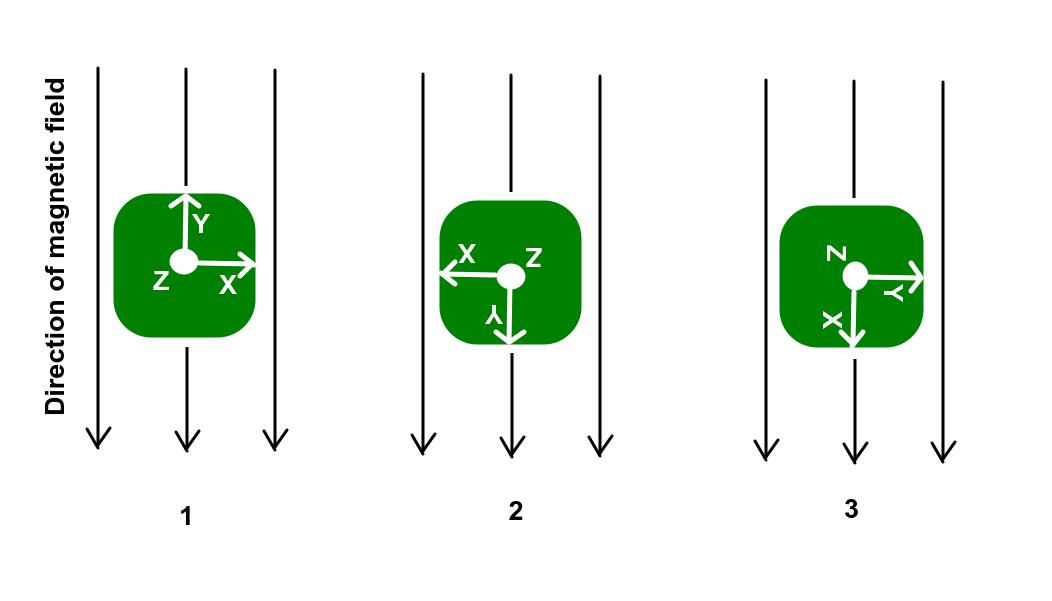
Let's call position one "straight ahead" and say that position 2 is rotated 180 degrees from position 1. In position 3 the sensor is rotated 90 degrees from position 1.
In positions 1 and 2, both X and Z would measure essentially zero since they are perpendicular to the field direction. The Y axes in both cases will measure the entire field strength but the signs will be opposite. In scenario 3, it is now X that measures the entire field strength while Y measures essentially zero.
As a level magnetometer is rotated, both the X and Y axes pass the same field in the same way. Because of this, we should expect the following of the X and Y data from a flat magnetometer that is rotated in a complete circle:
The X and Y measurements should have the same minimum and maximum
The measurements should cross zero twice per rotation
The midpoint of the range of the measurements should be zero
The measurements should be identical, but at different times during the rotation
Figure 3 shows a plot of magnetometer data as a sensor on a robot is rotated several times. The Y values in red mostly adhere to the above expectations, but the X values in blue deviate. The minimum and maximum are not equal and opposite, meaning that zero is not the midpoint. In fact, the X measurements remain below zero for the entire rotation, indicating a distortion along that axis. Fortunately, this is a distortion that can be measured and calibrated out.

Do I really need to calibrate if I don't need perfect accuracy?
If you rotate a sensor that is working properly the heading will cycle from -Pi to +Pi, crossing zero in the middle. There will be an abrupt jump as the heading goes from -Pi to +Pi or vice versa. This is normal, expected behavior.
Figure 4 shows the headings in blue that were calculated with the uncorrected data. The headings stay between 1 and 2 radians even though the sensor was being rotated in complete circles and should look more like the data in red. In short, I highly recommend you plan for regular calibration.

Calibration Procedure
Keep in mind that calibration needs to be done with the sensor mounted in its final position. You can calibrate it all by itself, but the correction values won't be correct once the distortions of the rest of a robot or whatever are then introduced. To calibrate the magnetometer, we need to follow these steps:
Either start recording all measurements or run a program that saves the highest and lowest values that occur for each axis
Rotate the sensor in one or more (preferably) complete circles about the z axis (
Note the highest and lowest values that occur for each axis
Find the midpoint of the range of values for each axis. For each axis, the midpoint = (min+max)/2
Record these midpoints to a file. - they are now the offsets we apply
Add a code to your heading calculation program to read the file and apply the offsets to each reading
In greater detail, let's look at each step:
Steps 1
Start your sensor streaming data and then your calibration program which, at this step, just needs to save every message to a vector. It is possible to do step 3 on this data live instead of saving it, but the latter gives you more opportunity to check the data for noise and outliers and apply some filter if necessary.
Step 2
Take your robot a flat, open spot outside and slowly rotate it a couple of times. The magnetometer I used is part of the IMU built into a ZED 2i stereo camera I had already mounted on a robot. I wrote a callback function for a ROS subscriber that simply appends each new value to a vector I could have either saved or used on the spot. This is the same data I shared in figure 3.
Step 3
Whether you read it from a file or just read it from the sensor, the goal is to find the lowest value and the highest value measured on each axis. You should end up with 2 variables for each axis.
Step 4
Find the midpoint of the range of values for each axis. For each axis, the midpoint = (min+max)/2
Step 5
Record these midpoints to a file so the heading calculator program can access them later.
Step 6
Apply to live data in your heading calculator program by subtracting the offsets from each and every raw measurement. The result should be data that adheres to the expectations we discussed earlier. Figure 5 shows my recorded data after calibration corrections have been made.

As you can see, the blue X and red Y data now have equal and opposite minimums and maximums and overall look very much the same. Figure 6 shows the result of performing the heading calculations we learned in the last article on this corrected data.

Now the calculated headings appropriately cover the expected range of -pi to +pi and matches our reference data quite accurately!
When to Recalibrate
Recalibration needs to be done when the magnetometer is moved to a different location on the robot (or whatever device you're using it in) or if there are changes to the robot that can affect the magnetic field (did you mount something else near the sensor?). It is also a good idea to recalibrate every few weeks or at least every couple of month, depending on the application's accuracy requirements. If you really need the best accuracy it only takes a minute to calibrate every day.
Let's get to the code
We need two programs: A program to find and save our calibration offsets, and a modified version of the heading calculator that applies the calibration offsets. Lets start with a simple calibration program that runs until 30 seconds has elapsed and some minimum number of samples have been collected. In practice, I prefer to have my program watch the data and look to confirm that 2-3 rotations have been completed.
C++
/******************************************************A sample program to collect and save calibration data*From the Practical Robotics blog at*www.lloydbrombach.com/blog**Lloyd Brombach*Feb 2023*******************************************************#include <iostream>#include <fstream>#include <vector>#include <chrono>#include <thread>using namespace std;double getRawDataX();double getRawDataY();int main(){ // vectors to store the readings until we are ready to save. vector<double> xData; vector<double> yData; const int MIN_DATA_COUNT = 300; const int ROTATION_TIME = 30; // 30 seconds for rotation int time_elapsed = 0; int last_time = time_elapsed; // prompt the user to get ready to rotate the device cout << "Get ready to rotate the device slowly for two complete rotations in " << ROTATION_TIME << " seconds\n"; cout << "to gather a minimum of " << MIN_DATA_COUNT << " samples. \n"; cout << "Press Enter when ready.\n"; cin.get(); // start collection cout << "GO! " << ROTATION_TIME - time_elapsed << " seconds remaining. "; auto start_time = chrono::steady_clock::now(); // start time int samples = 0; // to count samples // collect until time is up AND the minimum number of samples have been collected while (time_elapsed < ROTATION_TIME || samples < MIN_DATA_COUNT) { // get the magnetometer data and save it in the vector xData.push_back(getRawDataX()); yData.push_back(getRawDataY()); // give a progress update every second if (last_time != time_elapsed) { cout << "\n" << ROTATION_TIME - time_elapsed << " seconds remaining. " << samples << " samples collected."; last_time = time_elapsed; } this_thread::sleep_for(chrono::milliseconds(100)); // wait for 0.1 seconds time_elapsed = chrono::duration_cast<chrono::seconds>(chrono::steady_clock::now() - start_time).count(); samples++; // update count } // write the collected data to file and find the min and max values ofstream outFile("raw_data.dat"); double minX = xData[0], maxX = xData[0]; double minY = yData[0], maxY = yData[0]; for (int i = 0; i < xData.size(); i++) { outFile << xData[i] << " " << yData[i] << endl; // find min and max for each vector if (xData[i] < minX) minX = xData[i]; if (xData[i] > maxX) maxX = xData[i]; if (yData[i] < minY) minY = yData[i]; if (yData[i] > maxY) maxY = yData[i]; } outFile.close(); cout << endl << "Data collection complete. Saved " << samples << " measurements" << endl; // calculate midpoint of min and max for each vector double midX = (minX + maxX) / 2.0; double midY = (minY + maxY) / 2.0; // write midpoint values to calibration file ofstream calibFile("calibration_data.txt"); calibFile << midX << " " << midY << endl; calibFile.close(); cout << "\nCalibration data saved." << endl; return 0;}double getRawDataX(){ // replace with code to fetch and return your actual data return rand();}double getRawDataY(){ // replace with code to fetch and return your actual data return rand();}With the calibration offsets saved to a file, your compass heading calculation program just needs a function to retrieve those values and to subtract those values from the raw data as it comes in.
double offset_x, offset_y; // global variables to store offsetsvoid read_calibration_data() { ifstream calibFile("calibration_data.txt"); calibFile >> offset_x >> offset_y; calibFile.close();}Then it's as simple as subtracting those values from the raw measurements:
double corrected_x = getRawDataX() - offset_x;double corrected_y = getRawDataY() - offset_Y;Python
#######################################################A sample program to collect and save calibration data#From the Practical Robotics blog at#www.lloydbrombach.com/blog##Lloyd Brombach#Feb 2023######################################################import timeimport randomdef get_raw_data_x(): # replace with code to fetch and return your actual data return random.random()def get_raw_data_y(): # replace with code to fetch and return your actual data return random.random()# vectors to store the readings until we are ready to save.x_data = []y_data = []MIN_DATA_COUNT = 300ROTATION_TIME = 30 # 30 seconds for rotationtime_elapsed = 0last_time = time_elapsed# prompt the user to get ready to rotate the deviceprint(f"Get ready to rotate the device slowly for two complete rotations in {ROTATION_TIME} seconds")print(f"to gather a minimum of {MIN_DATA_COUNT} samples.")input("Press Enter when ready.\n")# start collectionprint(f"GO! {ROTATION_TIME - time_elapsed} seconds remaining. ")start_time = time.monotonic() # start timesamples = 0 # to count samples# collect until time is up AND the minimum number of samples have been collectedwhile time_elapsed < ROTATION_TIME or samples < MIN_DATA_COUNT: # get the magnetometer data and save it in the vector x_data.append(get_raw_data_x()) y_data.append(get_raw_data_y()) # give a progress update every second if last_time != time_elapsed: print(f"\n{ROTATION_TIME - time_elapsed} seconds remaining. {samples} samples collected.", end="") last_time = time_elapsed time.sleep(0.1) # wait for 0.1 seconds time_elapsed = int(time.monotonic() - start_time) samples += 1 # update count# write the collected data to file and find the min and max valueswith open("raw_data.dat", "w") as outFile: minX, maxX = x_data[0], x_data[0] minY, maxY = y_data[0], y_data[0] for i in range(len(x_data)): outFile.write(str(x_data[i]) + " " + str(y_data[i]) + "\n") # find min and max for each vector if x_data[i] < minX: minX = x_data[i] if x_data[i] > maxX: maxX = x_data[i] if y_data[i] < minY: minY = y_data[i] if y_data[i] > maxY: maxY = y_data[i] outFile.close() print("\nData collection complete. Saved", len(x_data), "measurements") # calculate midpoint of min and max for each vector midX = (minX + maxX) / 2.0 midY = (minY + maxY) / 2.0 # write midpoint values to calibration file with open("calibration_data.txt", "w") as calibFile: calibFile.write(str(midX) + " " + str(midY) + "\n") calibFile.close() print("Calibration data saved.")With the calibration offsets saved to a file, your compass heading calculation program just needs a function to retrieve those values and to subtract those values from the raw data as it comes in.
offset_x = 0.0offset_y = 0.0def read_calibration_data(): global offset_x, offset_y with open("calibration_data.txt", "r") as calibFile: offset_x, offset_y = map(float, calibFile.readline().split()) print("Calibration data read.")Then it's as simple as subtracting those values from the raw measurements:
corrected_x = getRawDataX() - offset_xcorrected_y = getRawDataY() - offset_YMATLAB
%%%%%%%%%%%%%%%%%%%%%%%%%%%%%%%%%%%%%%%%%%%%%%%%%%%%%%%A sample program to collect and save calibration data%From the Practical Robotics blog at%www.lloydbrombach.com/blog%%Lloyd Brombach%Feb 2023%%%%%%%%%%%%%%%%%%%%%%%%%%%%%%%%%%%%%%%%%%%%%%%%%%%%%%function main() % vectors to store the readings until we are ready to save. x_data = []; y_data = []; MIN_DATA_COUNT = 300; ROTATION_TIME = 30; % 30 seconds for rotation time_elapsed = 0; last_time = time_elapsed; % prompt the user to get ready to rotate the device disp(['Get ready to rotate the device slowly for two complete rotations in ' num2str(ROTATION_TIME) ' seconds']); disp(['to gather a minimum of ' num2str(MIN_DATA_COUNT) ' samples.']); input('Press Enter when ready.\n', 's'); % start collection disp(['GO! ' num2str(floor(ROTATION_TIME - time_elapsed)) ' seconds remaining. ']); start_time = tic; % start time samples = 0; % to count samples % collect until time is up AND the minimum number of samples have been collected while time_elapsed < ROTATION_TIME || samples < MIN_DATA_COUNT % get the magnetometer data and save it in the vector x_data(end+1) = getRawDataX(); y_data(end+1) = getRawDataY(); % give a progress update every second if time_elapsed - last_time >= 1 disp([num2str(floor(ROTATION_TIME - time_elapsed)) ' seconds remaining. ' num2str(samples) ' samples collected.']); last_time = time_elapsed; end pause(0.1); % wait for 0.1 seconds time_elapsed = toc(start_time); samples = samples + 1; % update count end minX = x_data(1); maxX = x_data(1); minY = y_data(1); maxY = y_data(1);for i = 1:samples % find min and max for each vector if x_data(i) < minX minX = x_data(i); end if x_data(i) > maxX maxX = x_data(i); end if y_data(i) < minY minY = y_data(i); end if y_data(i) > maxY maxY = y_data(i); endend% calculate midpoint of min and max for each vectormidX = (minX + maxX) / 2.0;midY = (minY + maxY) / 2.0;% save the data to a .mat filesave('raw_data.mat', 'x_data', 'y_data');disp(['Data collection complete. Saved ' num2str(samples)]);% save midpoint values to calibration filesave('calibration_data.mat', 'midX', 'midY'); disp('Calibration data saved.');endfunction x = getRawDataX() % replace with code to fetch and return your actual data x = rand();endfunction y = getRawDataY() % replace with code to fetch and return your actual data y = rand();endWith the calibration offsets saved to a file, your compass heading calculation program just needs a function to retrieve those values and to subtract those values from the raw data as it comes in. MATLAB makes this ridiculously easy.
function [offset_x, offset_y] = read_calibration_data() % Load calibration data from .mat file load('calibration_data.mat', 'offset_x', 'offset_y');endThen it's as simple as subtracting those values from the raw measurements:
corrected_x = getRawDataX() - offset_x;corrected_y = getRawDataY() - offset_Y;Conclusion
With parts 1 and 2 in this series behind us, we can now calculate accurate headings even when the magnetic field measurements are corrupted by nearby disturbances, but there is one more factor that can ruin our calculations – tilt. If the sensor is not fairly level, the X and Y measurements cannot be trusted. In the next article in this series, I willattempt to explain why and what we can do about it.


