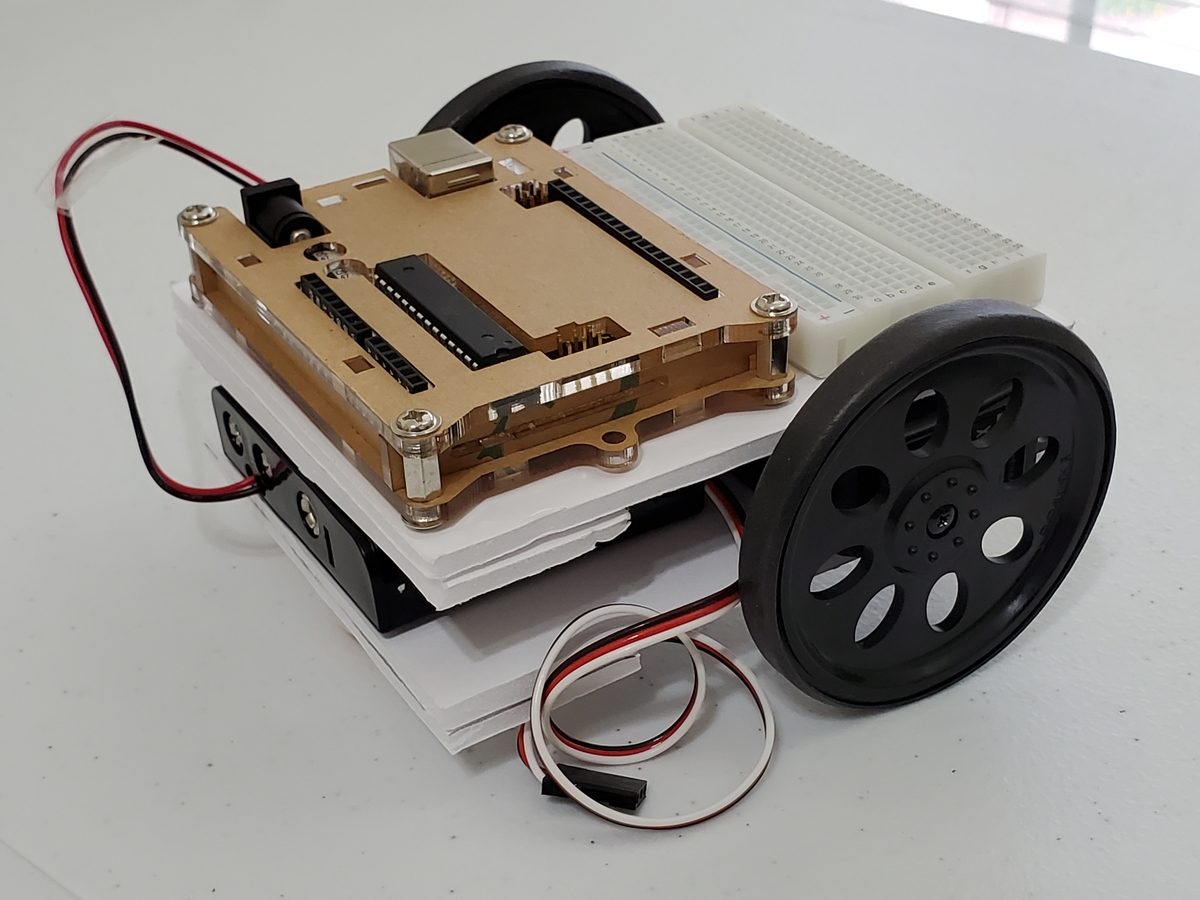
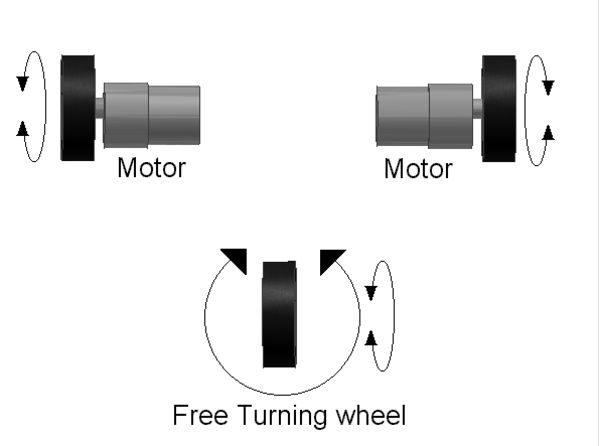
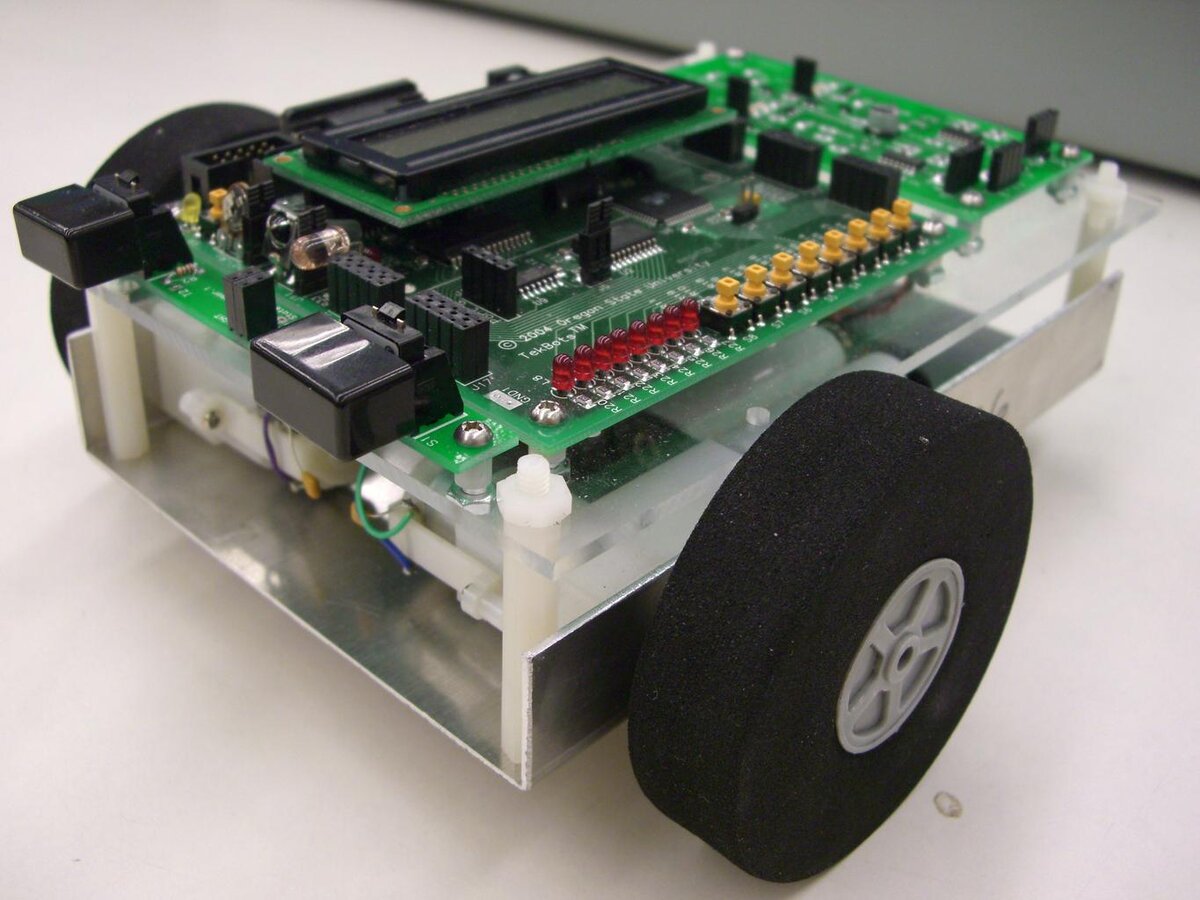
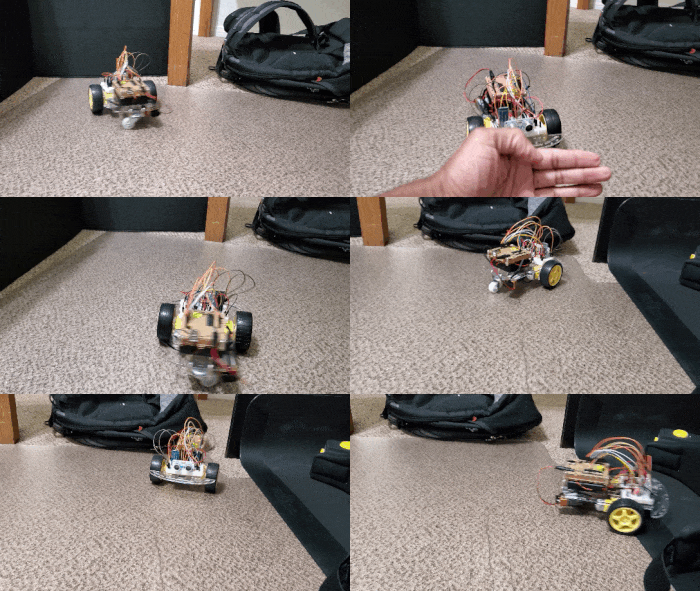
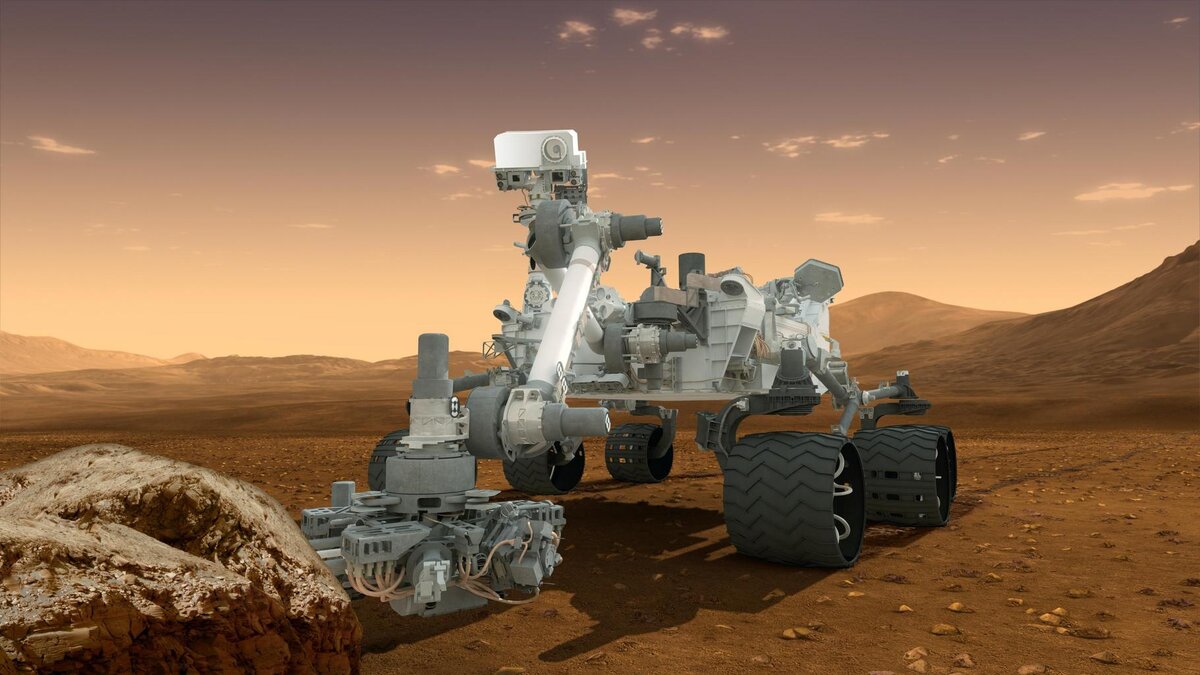
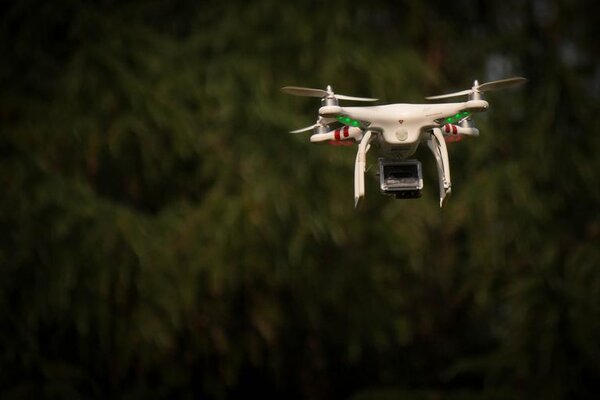
In this tutorial, we will learn how to derive the observation model for a two-wheeled mobile robot (I’ll explain what an observation model is below). Specifically, we’ll assume that our mobile robot is a differential drive robot like the one on the cover photo. A differential drive robot is one in which each wheel is driven independently from the other.
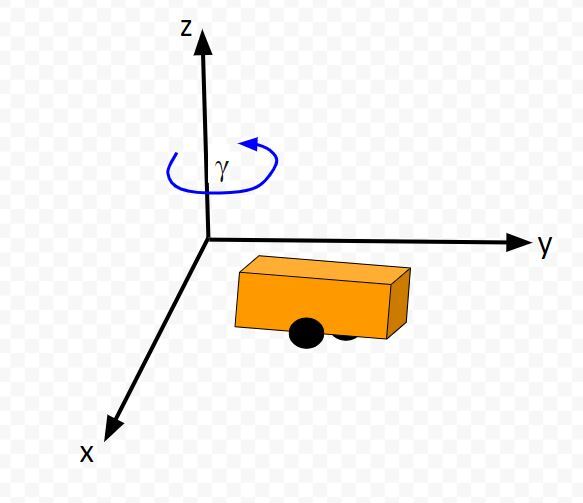
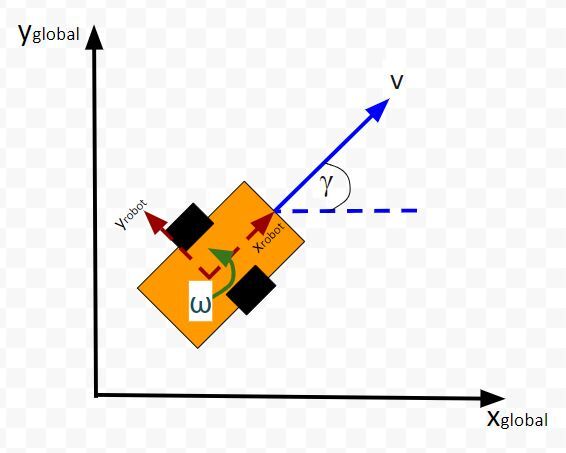
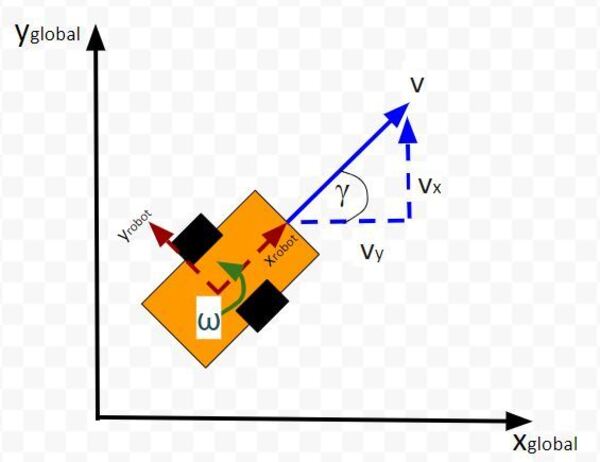
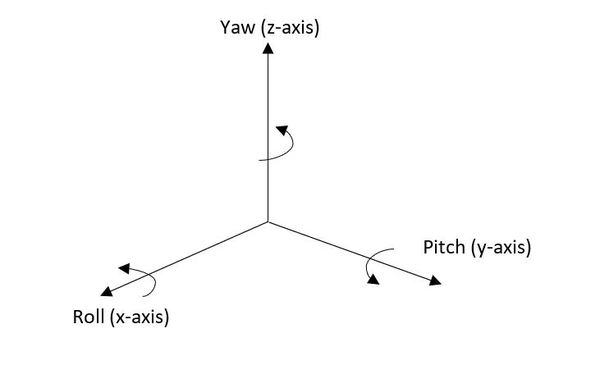
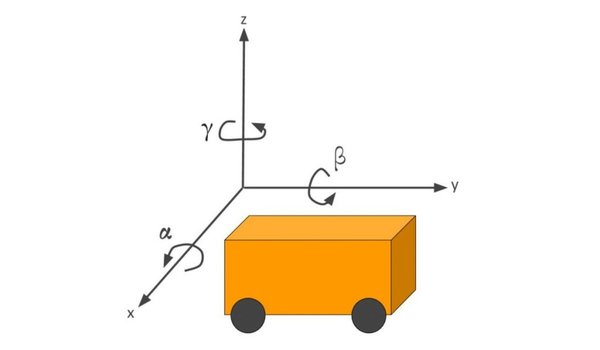
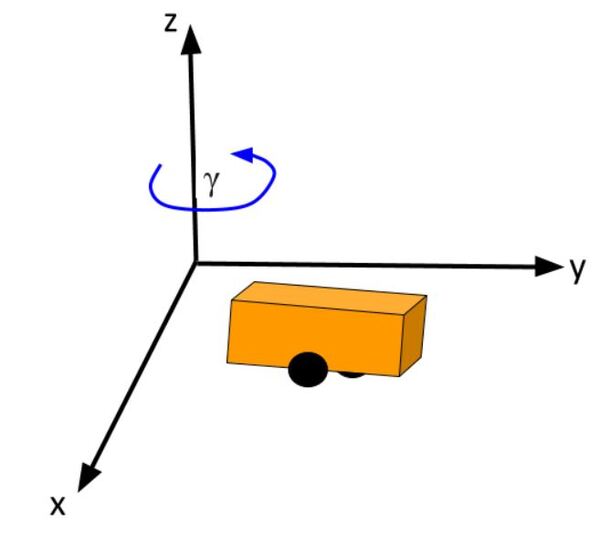
Below is a representation of a differential drive robot on a 3D coordinate plane with x, y, and z axes. The yaw angle γ represents the amount of rotation around the z axis as measured from the x axis.
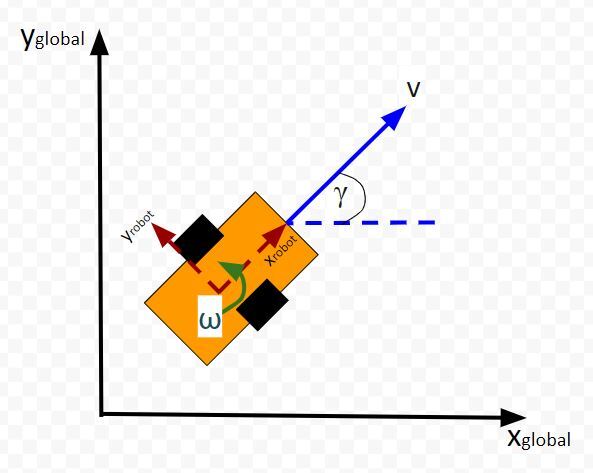
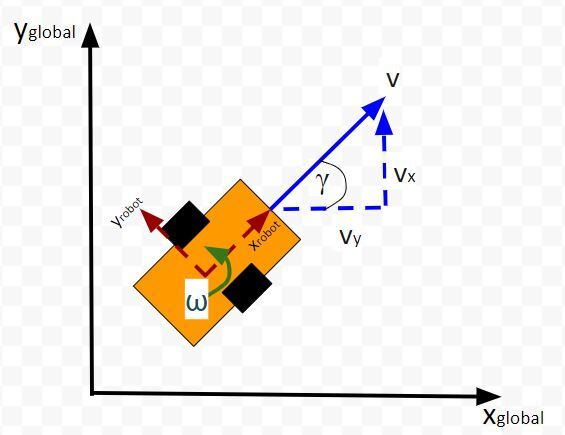
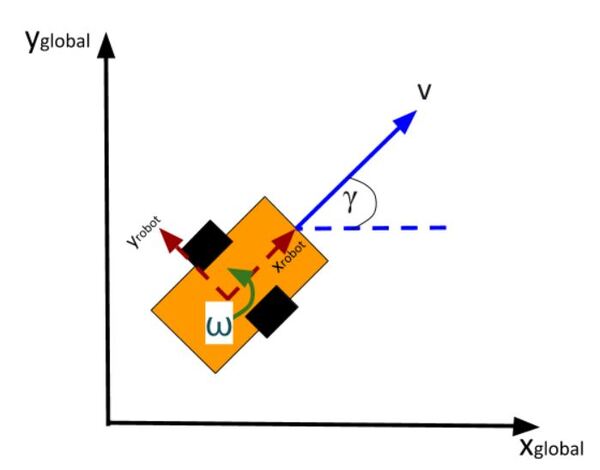
Here is the aerial view:
Table of Contents
Real World Applications
The most common application of deriving the observation model is when you want to do Kalman Filtering to smooth out noisy sensor measurements to generate a better estimate of the current state of a robotic system. I’ll cover this process in a future post. It is known as sensor fusion.
Prerequisites
It is helpful if you have gone through my tutorial on state space modeling. Otherwise, if you understand the concept of state space modeling, jump right into this tutorial.
What is an Observation Model?
Typically, when a mobile robot is moving around in the world, we gather measurements from sensors to create an estimate of the state (i.e. where the robot is located in its environment and how it is oriented relative to some axis).
An observation model does the opposite. Instead of converting sensor measurements to estimate the state, we use the state (or predicted state at the next timestep) to estimate (or predict) sensor measurements. The observation model is the mathematical equation that does this calculation.
You can understand why doing something like this is useful. Imagine you have a state space model of your mobile robot. You want the robot to move from a starting location to a goal location. In order to reach the goal location, the robot needs to know where it is located and which direction it is moving.
Suppose the robot’s sensors are really noisy, and you don’t trust its observations entirely to give you an accurate estimate of the current state. Or perhaps, all of a sudden, the sensor breaks, or generates erroneous data.
The observation model can help us in these scenarios. It enables you to predict what the sensor measurements would be at some timestep in the future.
The observation model works by first using the state model to predict the state of the robot at that next timestep and then using that state prediction to infer what the sensor measurement would be at that point in time.
You can then compute a weighted average (i.e. this is what you do during Kalman Filtering) of the predicted sensor measurements and the actual sensor observation at that timestep to create a better estimate of your state.
This is what you do when you do Kalman Filtering. You combine noisy sensor observations with predicted sensor measurements (based on your state space model) to create a near-optimal estimate of the state of a mobile robot at some time t.
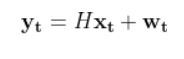
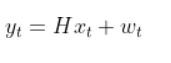
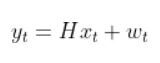
An observation model (also known as measurement model or sensor model) is a mathematical equation that represents a vector of predicted sensor measurements y at time t as a function of the state of a robotic system x at time t, plus some sensor noise (because sensors aren’t 100% perfect) at time t, denoted by vector wt.
Here is the formal equation:
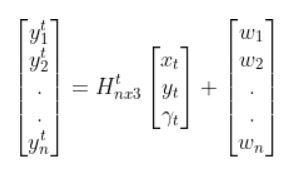
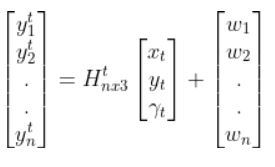
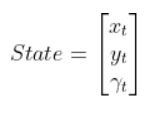
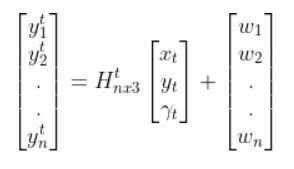
Because a mobile robot in 3D space has three states [x, y, yaw angle], in vector format, the observation model above becomes:
where:
t = current time
y vector (at left) = n predicted sensor observations at time t
n = number of sensor observations (i.e. measurements) at time t
H = measurement matrix (used to convert the state at time t into predicted sensor observations at time t) that has n rows and 3 columns (i.e. a column for each state variable).
w = the noise of each of the n sensor observations (you often get this sensor error information from the datasheet that comes when you purchase a sensor)
Sensor observations can be anything from distance to a landmark, to GPS readings, to ultrasonic distance sensor readings, to odometry readings….pretty much any number you can read from a robotic sensor that can help give you an estimate of the robot’s state (position and orientation) in the world.
The reason why I say predicted measurements for the y vector is because they are not actual sensor measurements. Rather you are using the state of a mobile robot (i.e. the current location and orientation of a robot in 3D space) at time t-1 to predict the next state at time t, and then you use that next state (estimate) at time t to infer what the corresponding sensor measurement would be at that point in time t.
How to Calculate the H Matrix
Let’s examine how to calculate H. The measurement matrix H is used to convert the predicted state estimate at time t into predicted sensor measurements at time t.
Imagine you had a sensor that could measure the x position, y position, and yaw angle (i.e. rotation angle around the z-axis) directly. What would H be?
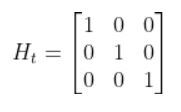
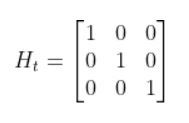
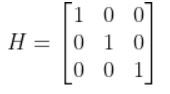
In this case, H will be the identity matrix since the estimated state maps directly to sensor measurements [x, y, yaw].
H has the same number of rows as sensor measurements and the same number of columns as states. Here is how the matrix would look in this scenario.
What if, for example, you had a landmark in your environment. How does the current state of the robot enable you to calculate the distance (i.e. range) to the landmark r and the bearing angle b to the landmark?
The formulas in the vector above are nonlinear (note the arctan2 function). They enable us to take the current state of the robot at time t and infer the corresponding sensor observations r and b at time t.
Let’s linearize the model to create a linear observation model of the following form:
We have to calculate the Jacobian, just as we did when we calculated the A and B matrices in the state space modeling tutorial.
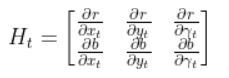
The formula for Ht is as follows:
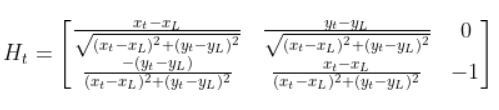
So we need to calculate 6 different partial derivatives. Here is what you should get:
Putting It All Together
The final observation model is as follows:
Equivalently, in some literature, you might see that all the stuff above is equal to:
In fact, in the Wikipedia Extended Kalman Filter article, they replace time t with time k (not sure why because t is a lot more intuitive, but it is what it is).
Python Code Example for the Observation Model
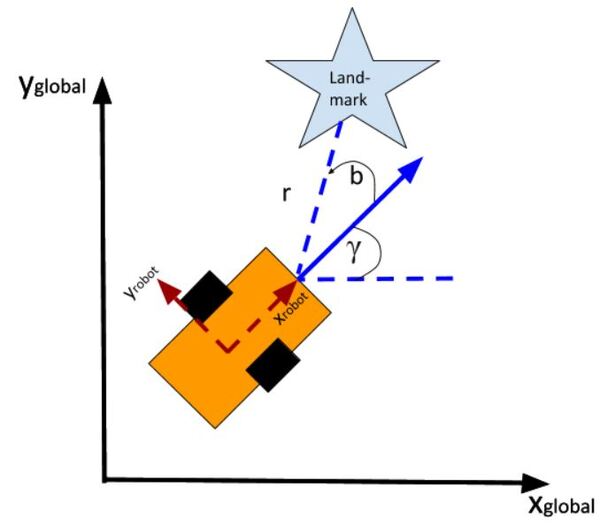
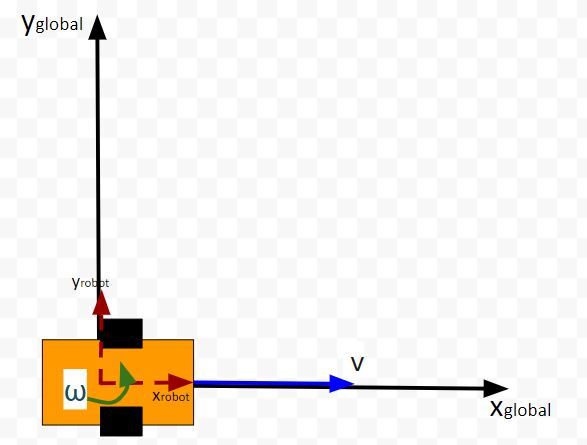
Let’s create an observation model in code. As a reminder, here is our robot model (as seen from above).
We’ll assume we have a sensor on our mobile robot that is able to give us exact measurements of the xglobal position in meters, yglobal position in meters, and yaw angle γ of the robot in radians at each timestep.
Therefore, as mentioned earlier,
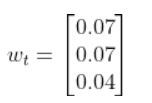
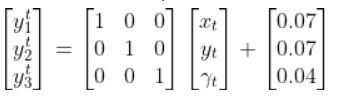
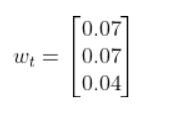
We’ll also assume that the corresponding noise (error) for our sensor readings is +/-0.07 m for the x position, +/-0.07 m for the y position, and +/-0.04 radians for the yaw angle. Therefore, here is the sensor noise vector:
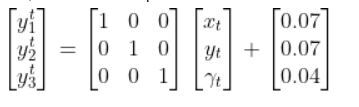
So, here is our equation:
Suppose that the state of the robot at time t is [x=5.2, y=2.8, yaw angle=1.5708]. Because the yaw angle is 90 degrees (1.5708 radians), we know that the robot is heading due north relative to the global reference frame (i.e. the world or environment the robot is in).
What is the corresponding estimated sensor observation at time t given the current state of the robot at time t?
# Description: An observation model for a differential drive mobile robot
# Measurement matrix H_t
# Used to convert the predicted state estimate at time t
# into predicted sensor measurements at time t.
# In this case, H will be the identity matrix since the
# estimated state maps directly to state measurements from the
# odometry data [x, y, yaw]
# H has the same number of rows as sensor measurements
# and same number of columns as states.
H_t =np.array([ [1.0, 0, 0],
[ 0,1.0, 0],
[ 0, 0, 1.0]])
# Sensor noise. This is a vector with the
# number of elements equal to the number of sensor measurements.
sensor_noise_w_t =np.array([0.07,0.07,0.04])
# The estimated state vector at time t in the global
# reference frame
# [x_t, y_t, yaw_t]
# [meters, meters, radians]
state_estimate_t =np.array([5.2,2.8,1.5708])
defmain():
estimated_sensor_observation_y_t =H_t @ (
state_estimate_t) +(
sensor_noise_w_t)
print(f'State at time t: {state_estimate_t}')
print(f'Estimated sensor observations at time t: {estimated_sensor_observation_y_t}')
main()
Here is the output:
And that’s it folks. That linear observation model above enables you to convert the state at time t to estimated sensor observations at time t.
In a real robot application, we would use an Extended Kalman Filter to compute a weighted average of the estimated sensor reading using the observation model and the actual sensor reading that is mounted on your robot. In my next tutorial, I’ll show you how to implement an Extended Kalman Filter from scratch, building on the content we covered in this tutorial.
Have you ever wondered how those robots navigate around restaurants or hospitals, delivering food or fetching supplies? These little marvels of engineering often rely on a simple yet powerful concept: the differential drive robot.
A differential drive robot uses two independently powered wheels and often has one or more passive caster wheels. By controlling the speed and direction of each wheel, the robot can move forward, backward, turn, or even spin in place.
This tutorial will delve into the behind-the-scenes calculations that translate desired robot motion (linear and angular velocities) into individual wheel speeds (rotational velocities in revolutions per second).
Table of Contents
Real-World Applications
Differential drive robots, with their two independently controlled wheels, are widely used for their maneuverability and simplicity. Here are some real-world applications:
Delivery and Warehousing:
Inventory management: Many warehouse robots use differential drive designs. They can navigate narrow aisles, efficiently locate and transport goods, and perform stock checks.
Last-mile delivery: Delivery robots on sidewalks and in controlled environments often employ differential drive. They can navigate crowded areas and deliver packages autonomously.
Domestic and Public Use:
Floor cleaning robots: These robots navigate homes and offices using differential drive. They can efficiently clean floors while avoiding obstacles.
Disinfection robots: In hospitals and public areas, differential drive robots can be used for disinfecting surfaces with UV light or other methods.
Security robots: These robots patrol buildings or outdoor spaces, using differential drive for maneuverability during surveillance.
Specialized Applications:
Agricultural robots: Differential drive robots can be used in fields for tasks like planting seeds or collecting data on crops.
Military robots: Small reconnaissance robots often use differential drive for navigating rough terrain.
Entertainment robots: Robots designed for entertainment or education may utilize differential drive for movement and interaction.
Restaurant robots: Robots that deliver from the kitchen to the dining room.
Why Differential Drive for these Applications?
Differential drive robots offer several advantages for these tasks:
Simple design: Their two-wheeled platform makes them relatively easy and inexpensive to build.
Maneuverability: By controlling the speed of each wheel independently, they can turn sharply and navigate complex environments.
Compact size: Their design allows them to operate in tight spaces.
Convert Commanded Velocities to Wheel Linear Velocities
The robot’s motion is defined by two control inputs: the linear velocity (V) and the angular velocity (ω) of the robot in its reference frame.
The linear velocity is the speed at which you want the robot to move forward or backward, while the angular velocity defines how fast you want the robot to turn clockwise and counterclockwise.
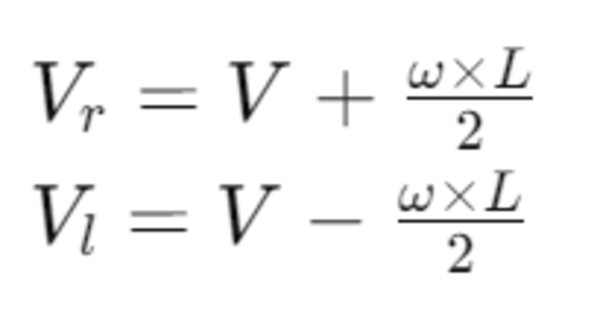
The linear velocities of the right (Vr) and the left (Vl) wheels can be calculated using the robot’s wheelbase width (L), which is the distance between the centers of the two wheels:
Convert Linear Velocity to Rotational Velocity
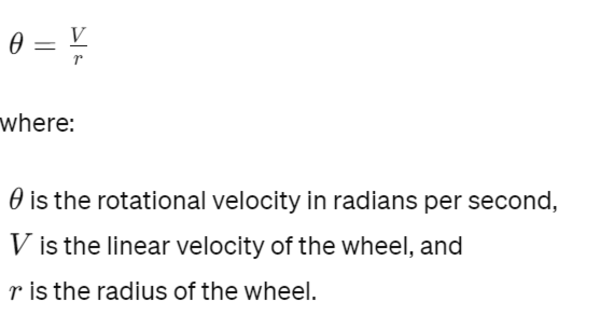
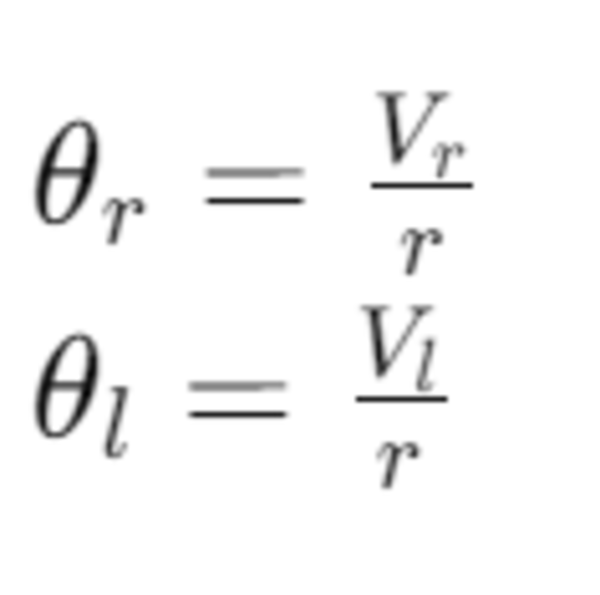
Once we have the linear velocities of the wheels, we need to convert them into rotational velocities. The rotational velocity (θ) in radians per second for each wheel is given by:
Thus, the rotational velocities of the right and left wheels are:
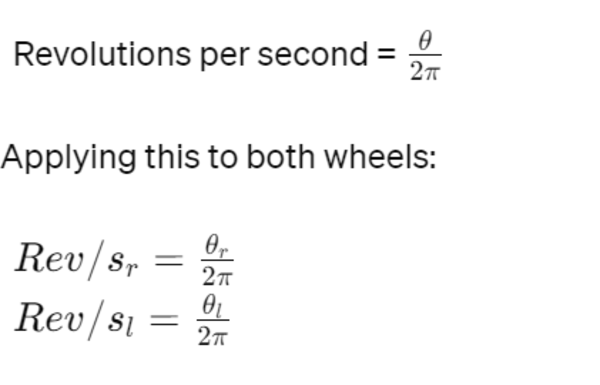
Convert Radians per Second to Revolutions per Second
The final step is to convert the rotational velocities from radians per second to revolutions per second (rev/s) for practical use. Since there are 2π radians in a full revolution:
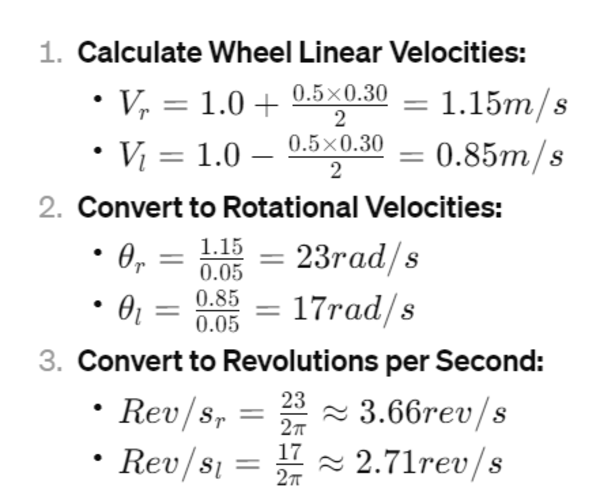
Example
Let’s calculate the wheel velocities for a robot with a wheel radius of 0.05m, wheelbase width of 0.30m, commanded linear velocity of 1.0m/s, and angular velocity of 0.5rad/s.
In this tutorial, we will learn how to create a state space model for a mobile robot. Specifically, we’ll take a look at a type of mobile robot called a differential drive robot. A differential drive robot is a robot like the one on the cover photo of this post, as well as this one below. It is called differential drive because each wheel is driven independently from the other.
Optional: Python 3.7 or higher (just needed for the last part of this tutorial)
There are a lot of tutorials on YouTube if you don’t have the prerequisites above (e.g. Khan Academy).
What is a State Space Model?
A state space model (often called the state transition model) is a mathematical equation that represents the motion of a robotic system from one timestep to the next. It shows how the current position (e.g. X, Y coordinate) and orientation (yaw (heading) angle γ) of the robot in the world is impacted by changes to the control inputs into the robot (e.g. velocity in meters per second…often represented by the variable v).
Note: In a real-world scenario, we would need to represent the world the robot is in (e.g. a room in your house, etc.) as an x,y,z coordinate grid.
Deriving the Equations
Consider the mobile robot below. It is moving around on the flat x-y coordinate plane.
Let’s look at it from an aerial view.
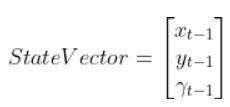
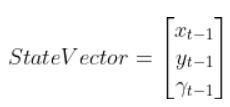
What is the position and orientation of the robot in the world (i.e. global reference frame)? The position and orientation of a robot make up what we call the state vector.
Note that x and y as well as the yaw angle γ are in the global reference frame.
The yaw angle γ describes the rotation around the z-axis (coming out of the page in the image above) in the counterclockwise direction (from the x axis). The units for the yaw angle are typically radians.
ω is the rotation rate (i.e. angular velocity or yaw rate) around the global z axis. Typically the units on this variable is radians per second.
The velocity of the robot v is in terms of the robot reference frame (labeled xrobot and yrobot).
In terms of the global reference frame we can break v down into two components:
velocity in the x direction vx
velocity in the y direction vy.
In most of my applications, I express the velocity in meters per second.
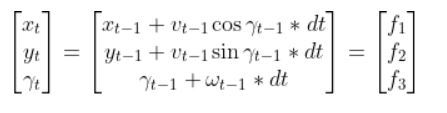
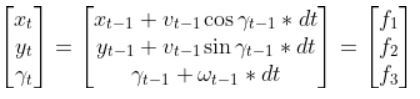
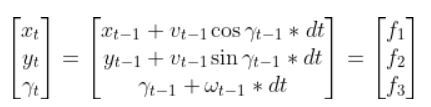
Therefore, with respect to the global reference frame, the robot’s motion equations are as follows:
linear velocity in the x direction = vx = vcos(γ)
linear velocity in the y direction = vy = vsin(γ)
angular velocity around the z axis = ω
Now let’s suppose at time t-1, the robot has the current state (x position, y position, yaw angle γ):
We move forward one timestep dt. What is the state of the robot at time t? In other words, where is the robot location, and how is the robot oriented?
Remember that distance = velocity * time.
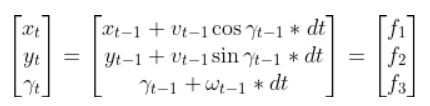
Therefore,
Converting the Equations to a State Space Model
We now know how to describe the motion of the robot mathematically. However the equation above is nonlinear. For some applications, like using the Kalman Filter (I’ll cover Kalman Filters in a future post), we need to make our state space equations linear.
How do we take this equation that is nonlinear (note the cosines and sines)…
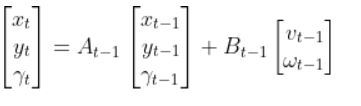
xt is our entire current state vector [xt, yt,γt] (i.e. note xt in bold is the entire state vector…don’t get that confused with xt, which is just the x coordinate of the robot at time t)
xt-1 is the state of the mobile robot at the previous timestep: [xt-1, yt-1,γt-1]
ut-1represents the control input vector at the previous timestep [vt-1, ωt-1] = [forward velocity, angular velocity].
I’ll get to what the A and B matrices represent later in this post.
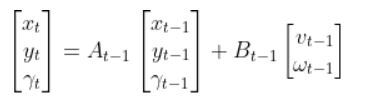
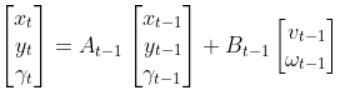
Let’s write out the full form of the linear state space model equation:
Let’s go through this equation term by term to make sure we understand everything so we can convert this equation below into the form above:
How to Calculate the A Matrix
A is a matrix. The number of rows in the A matrix is equal to the number of states, and the number of columns in the A matrix is equal to the number of states. In this mobile robot example, we have three states.
The A matrix expresses how the state of the system [x position,y position,yaw angle γ] changes from t-1 to t when no control command is executed (i.e. when we don’t give any speed (velocity) commands to the robot).
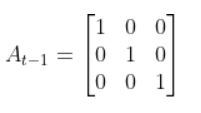
Typically a robot on wheels only drives when the wheels are commanded to turn. Therefore, for this case, A is the identity matrix (Note that A is sometimes F in the literature).
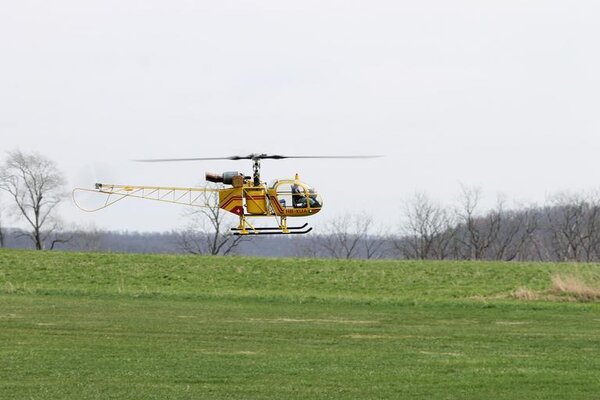
In other applications, A might not be the identity matrix. An example is a helicopter. The state of a helicopter flying around in the air changes even if you give it no velocity command. Gravity will pull the helicopter downward to Earth regardless of what you do. It will eventually crash if you give it no velocity commands.
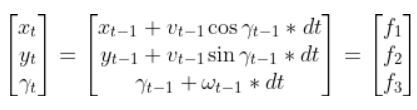
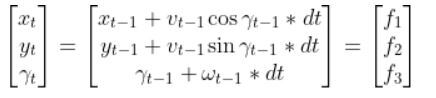
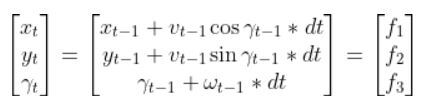
Formally, to calculate A, you start with the equation for each state vector variable. In our mobile robot example, that is this stuff below.
Our system is expressed as a nonlinear system now because the state is a function of cosines and sines (which are nonlinear trigonometric operations).
To get our state space model in this form…
…we need to “linearize” the nonlinear equations. To do this, we need to calculate the Jacobian, which is nothing more than a fancy name for “matrix of partial derivatives.”
Do you remember the equation for a straight line from grade school: y=mx+b? m is the slope. It is “change in y / change in x”.
The Jacobian is nothing more than a multivariable form of the slope m. It is “change in y1/x1, change in y2/x2, change in y3/x3, etc….”
You can consider the Jacobian a slope on steroids. It represents how fast a group of variables (as opposed to just one variable…(e.g. m = rise/run = change in y/change in x) are changing with respect to another group of variables.
You start with this here:
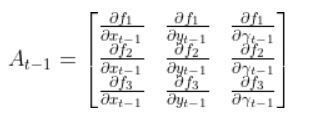
You then calculate the partial derivative of the state vector at time t with respect to the states at time t-1. Don’t be scared at all the funny symbols inside this matrix A. When you’re calculating the Jacobian matrix, you calculate each partial derivative, one at a time.
You will have to calculate 9 partial derivatives in total for this example.
Again, if you are a bit rusty on calculating partial derivatives, there are some good tutorials online. We’ll do an example calculation now so you can see how this works.
Let’s calculate the first partial derivative in the upper left corner of the matrix.
and
So, 1 goes in the upper-left corner of the matrix.
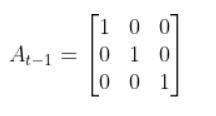
If you calculate all 9 partial derivatives above, you’ll get:
which is the identity matrix.
How to Calculate the B Matrix
The B matrix in our running example of a mobile robot is a 3×2 matrix.
The B matrix has the same number of rows as the number of states and has the same number of columns as the number of control inputs.
The control inputs in this example are the linear velocity (v) and the angular velocity around the z axis, ω (also known as the “yaw rate”).
The B matrix expresses how the state of the system (i.e. [x,y,γ]) changes from t-1 to t due to the control commands (i.e. control inputs v and ω)
Since we’re dealing with a robotic car here, we know that if we apply forward and angular velocity commands to the car, the car will move.
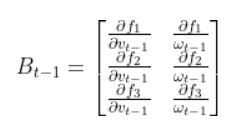
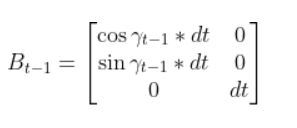
The equation for B is as follows. We need to calculate yet another Jacobian matrix. However, unlike our calculation for the A matrix, we need to compute the partial derivative of the state vector at time t with respect to the control inputs at time t-1.
Remember the equations for f1, f2, and f3:
If you calculate the 6 partial derivatives, you’ll get this for the B matrix below:
Putting It All Together
Ok, so how do we get from this:
Into this form:
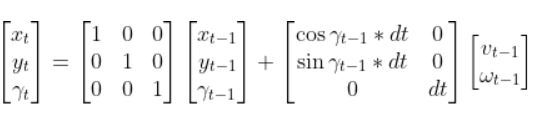
We now know the A and B matrices, so we can plug those in. The final state space model for our differential drive robot is as follows:
where vt-1 is the linear velocity of the robot in the robot’s reference frame, and ωt-1 is the angular velocity in the robot’s reference frame.
And there you have it. If you know the current position of the robot (x,y), the orientation of the robot (yaw angle γ), the linear velocity of the robot, the angular velocity of the robot, and the change in time from one timestep to the next, you can calculate the state of the robot at the next timestep.
Adding Process Noise
The world isn’t perfect. Sometimes the robot might not act the way you would expect when you want it to execute a specific velocity command.
It is often common to add a noise term to the state space model to account for randomness in the world. The equation would then be:
Python Code Example for the State Space Model
In this section, I’ll show you code in Python for the state space model we have developed in this tutorial. We will assume:
The robot begins at the origin at a yaw angle of 0 radians.
We then apply a forward velocity of 4.5 meters per second at time t-1 and an angular velocity of 0.05 radians per second.
The output will show the state of the robot at the next timestep, time t. I’ll name the file state_space_model.py.
Make sure you have NumPy installed before you run the code. NumPy is a scientific computing library for Python.
If you’re using Anaconda, you can type:
conda install numpy
Alternatively, you can type:
pip install numpy
Here is the code. You can copy and paste this code into your favorite IDE and then run it.
3x2 matix -> number of states x number of control inputs
The control inputs are the forward speed and the
rotation rate around the z axis from the x-axis in the
counterclockwise direction.
[v, yaw_rate]
Expresses how the state of the system [x,y,yaw] changes
from t-1 to t due to the control commands (i.e. control
input).
:param yaw: The yaw (rotation angle around the z axis) in rad
:param dt: The change in time from time step t-1 to t in sec
"""
B =np.array([[np.cos(yaw)*dt, 0],
[np.sin(yaw)*dt, 0],
[0, dt]])
returnB
defmain():
state_estimate_t =A_t_minus_1 @ (
state_estimate_t_minus_1) +(
getB(yaw_angle, delta_t)) @ (
control_vector_t_minus_1) +(
process_noise_v_t_minus_1)
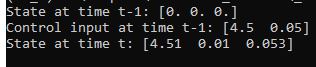
print(f'State at time t-1: {state_estimate_t_minus_1}')
print(f'Control input at time t-1: {control_vector_t_minus_1}')
print(f'State at time t: {state_estimate_t}') # State after delta_t seconds
main()
Run the code:
python state_space_model.py
Here is the output:
And that’s it for the fundamentals of state space modeling. Once you know the physics of how a robotic system moves from one timestep to the next, you can create a mathematical model in state space form.
In this tutorial, we will cover everything you need to know about Extended Kalman Filters (EKF). At the end, I have included a detailed example using Python code to show you how to implement EKFs from scratch.
I recommend going slowly through this tutorial. There is no hurry. There is a lot of new terminology, and I attempt to explain each piece in a simple way, term by term, always referring back to a running example (e.g. a robot car). Try to understand each section in this tutorial before moving on to the next. If something doesn’t make sense, go over it again. By the end of this tutorial, you’ll understand what an EKF is, and you’ll know how to build one starting from nothing but a blank Python program.
Table of Contents
Real-World Applications
EKFs are common in real-world robotics applications. You’ll see them in everything from self-driving cars to drones.
EKFs are useful when:
You have a robot with sensors attached to it that enable it to perceive the world.
Your robot’s sensors are noisy and aren’t 100% accurate (which is always the case).
By running all sensor observations through an EKF, you smooth out noisy sensor measurements and can calculate a better estimate of the state of the robot at each timestep t as the robot moves around in the world. By “state”, I mean “where is the robot,” “what is its orientation,” etc.
Prerequisites
To get the most out of this tutorial, I recommend you go through these two tutorials first. In order to understand what an EKF is, you should know what a state space model and an observation model are. These mathematical models are the two main building blocks for EKFs.
Otherwise, if you feel confident about state space models and observations models, jump right into this tutorial.
What is the Extended Kalman Filter?
Before we dive into the details of how EKFs work, let’s understand what EKFs do on a high level. We want to know why we use EKFs.
Consider this two-wheeled differential drive robot car below.
We can model this car like this. The car moves around on the x-y coordinate plane, while the z-axis faces upwards towards the sky:
Here is an aerial view of the same robot above. You can see the global coordinate frame, the robot coordinate frame as well as the angular velocity ω (typically in radians per second) and linear velocity v (typically in meters per second):
What is this robot’s state at some time t?
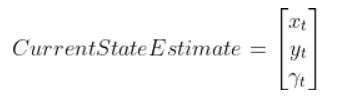
The state of this robot at some time t can be described by just three values: its x position, y position, and yaw angle γ. The yaw angle is the angle of rotation around the z-axis (which points straight out of this page) as measured from the x axis.
Here is the state vector:
In most cases, the robot has sensors mounted on it. Information from these sensors is used to generate the state vector at each timestep.
However, sensor measurements are uncertain. They aren’t 100% accurate. They can also be noisy, varying a lot from one timestep to the next. So we can never be totally sure where the robot is located in the world and how it is oriented.
Therefore, the state vectors that are calculated at each timestep as the robot moves around in the world is at best an estimate.
How can we generate a better estimate of the state at each timestep t? We don’t want to totally depend on the robot’s sensors to generate an estimate of the state.
Here is what we can do.
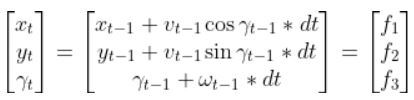
Remember the state space model of the robot car above? Here it is.
You can see that if we know…
The state estimate for the previous timestep t-1
The time interval dt from one timestep to the next
The linear and angular velocity of the car at the previous time step t-1 (i.e. previous control inputs…i.e. commands that were sent to the robot to make the wheels rotate accordingly)
An estimate of random noise (typically small values…when we send velocity commands to the car, it doesn’t move exactly at those velocities so we add in some random noise)
…then we can estimate the current state of the robot at time t.
Then, using the observation model, we can use the current state estimate at time t (above) to infer what the corresponding sensor measurement vector would be at the current timestep t (this is the y vector on the left-hand side of the equation below).
Note: If that equation above doesn’t make sense to you, please check out the observation model tutorial where I derive it from scratch and show an example in Python code.
The y vector represents predicted sensor measurements for the current timestep t. I say “predicted” because remember the process we went through above. We started by using the previous estimate of the state (at time t-1) to estimate the current state at time t. Then we used the current state at time t to infer what the sensor measurements would be at the current timestep (i.e. y vector).
From here, the Extended Kalman Filter takes care of the rest. It calculates a weighted average of actual sensor measurements at the current timestep t and predicted sensor measurements at the current timestep t to generate a better current state estimate.
The Extended Kalman Filter is an algorithm that leverages our knowledge of the physics of motion of the system (i.e. the state space model) to make small adjustments to (i.e. to filter) the actual sensor measurements (i.e. what the robot’s sensors actually observed) to reduce the amount of noise, and as a result, generate a better estimate of the state of a system.
EKFs tend to generate more accurate estimates of the state (i.e. state vectors) than using just actual sensor measurements alone.
In the case of robotics, EKFs help generate a smooth estimate of the current state of a robotic system over time by combining both actual sensor measurements and predicted sensor measurements to help remove the impact of noise and inaccuracies in sensor measurements.
This is how EKFs work on a high level. I’ll go through the algorithm step by step later in this tutorial.
What is the Difference Between the Kalman Filter and the Extended Kalman Filter?
The regular Kalman Filter is designed to generate estimates of the state just like the Extended Kalman Filter. However, the Kalman Filter only works when the state space model (i.e. state transition function) is linear; that is, the function that governs the transition from one state to the next can be plotted as a line on a graph).
The Extended Kalman Filter was developed to enable the Kalman Filter to be applied to systems that have nonlinear dynamics like our mobile robot.
For example, the Kalman Filter algorithm won’t work with an equation in this form:
But it will work if the equation is in this form:
Another example…consider the equation
Next State = 4 * (Current State) + 3
This is the equation of a line. The regular Kalman Filter can be used on systems like this.
Now, consider this equation
Next State = Current State + 17 * cos(Current State).
This equation is nonlinear. If you were to plot it on a graph, you would see that it is not the graph of a straight line. The regular Kalman Filter won’t work on systems like this. So what do we do?
Fortunately, mathematics can help us linearize nonlinear equations like the one above. Once we linearize this equation, we can then use it in the regular Kalman Filter.
If you were to zoom in to an arbitrary point on a nonlinear curve, you would see that it would look very much like a line. With the Extended Kalman Filter, we convert the nonlinear equation into a linearized form using a special matrix called the Jacobian (see my State Space Model tutorial which shows how to do this). We then use this linearized form of the equation to complete the Kalman Filtering process.
Now let’s take a look at the assumptions behind using EKFs.
Extended Kalman Filter Assumptions
EKFs assume you have already derived two key mathematical equations (i.e. models):
State Space Model: A state space model (often called the state transition model) is a mathematical equation that helps you estimate the state of a system at time t given the state of a system at time t-1.
Observation Model: An observation model is a mathematical equation that expresses sensor measurements at time t as a function of the state of a robot at time t.
The State Space Model takes the following form:
There is also typically a noise vector term vt-1 added on to the end as well. This noise term is known as process noise. It represents error in the state calculation.
In the robot car example from the state space modeling tutorial, the equation above was expanded out to be:
The Observation Model is of the following form:
In the robot car example from the observation model tutorial, the equation above was:
Where:
We also assumed that the corresponding noise (error) for our sensor readings was +/-0.07 m for the x position, +/-0.07 m for the y position, and +/-0.04 radians for the yaw angle. Therefore, here was the sensor noise vector:
EKF Algorithm
Overview
On a high-level, the EKF algorithm has two stages, a predict phase and an update (correction phase). Don’t worry if all this sounds confusing. We’ll walk through each line of the EKF algorithm step by step. Each line below corresponds to the same line on this Wikipedia entry on EKFs.
Predict Step
Using the state space model of the robotics system, predict the state estimate at time t based on the state estimate at time t-1 and the control input applied at time t-1.
This is exactly what we did in my state space modeling tutorial.
Predict the state covariance estimate based on the previous covariance and some noise.
Update (Correct) Step
Calculate the difference between the actual sensor measurements at time t minus what the measurement model predicted the sensor measurements would be for the current timestep t.
Calculate the measurement residual covariance.
Calculate the near-optimal Kalman gain.
Calculate an updated state estimate for time t.
Update the state covariance estimate for time t.
Let’s go through those bullet points above and define what will likely be some new terms for you.
What Does Covariance Mean?
Note that the covariance measures how much two variables vary with respect to each other.
For example, suppose we have two variables:
X: Number of hours a student spends studying
Y: Course grade
We do some calculations and find that:
Covariance(X,Y) = 147
What does this mean?
A positive covariance means that both variables increase or decrease together. In other words, as the number of hours studying increases, the course grade increases. Similarly, as the number of hours studying decreases, the course grade decreases.
A negative covariance means that while one variable increases, the other variable decreases.
For example, there might be a negative covariance between the number of hours a student spends partying and his course grade.
A covariance of 0 means that the two variables are independent of each other.
For example, a student’s hair color and course grade would have a covariance of 0.
EKF Algorithm Step-by-Step
Let’s walk through each line of the EKF algorithm together, step by step. We will use the notation given on the EKF Wikipedia page where for time they use k instead of t.
Go slowly in this section. There is a lot of new mathematical notation and a lot of subscripts and superscripts. Take your time so that you understand each line of the algorithm. I really want you to finish this article with a strong understanding of EKFs.
1. Initialization
For the first iteration of EKF, we start at time k. In other words, for the first run of EKF, we assume the current time is k.
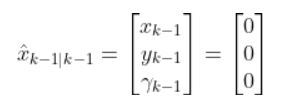
We initialize the state vector and control vector for the previous time step k-1.
In a real application, the first iteration of EKF, we would let k=1. Therefore, the previous timestep k-1, would be 0.
In our running example of a robotic car, the initial state vector for the previous timestep k-1 would be as follows. Remember the state vector is in terms of the global coordinate frame:
You can see in the equation above that we assume the robot starts out at the origin facing in the positive xglobal direction.
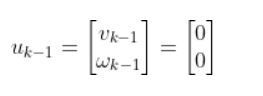
Let’s assume the control input vector at the previous timestep k-1 was nothing (i.e. car was commanded to remain at rest). Therefore, the starting control input vector is as follows.
where:
vk-1 = forward velocity in the robot frame at time k-1
ωk-1= angular velocity around the z-axis at time k-1 (also known as yaw rate or heading angle)
2. Predicted State Estimate
This part of the EKF algorithm is exactly what we did in my state space modeling tutorial.
Remember, we are currently at time k.
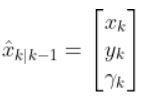
We use the state space model, the state estimate for timestep k-1, and the control input vector at the previous time step (e.g. at time k-1) to predict what the state would be for time k (which is the current timestep).
That equation above is the same thing as our equation below. Remember that we used t in my earlier tutorials. However, now I’m replacing t with k to align with the Wikipedia notation for the EKF.
where:
This estimated state prediction for time k is currently our best guess of the current state of the system (e.g. robot).
We also add some noise to the calculation using the process noise vector vk-1 (a 3×1 matrix in the robot car example because we have three states. x position, y position, and yaw angle).
In our running robot car example, we might want to make that noise vector something like [0.01, 0.01, 0.03]. In a real application, you can play around with that number to see what you get.
Robot Car Example
For our running robot car example, let’s see how the Predicted State Estimate step works. Remember dt = dk because t=k…i.e. change in time from one timestep to the next.
We have…
where:
3. Predicted Covariance of the State Estimate
We now have a predicted state estimate for time k, but predicted state estimates aren’t 100% accurate.
In this step—step 3 of the EKF algorithm— we predict the state covariance matrix Pk|k-1 (sometimes called Sigma) for the current time step (i.e. k).
You notice the subscript on P is k|k-1? What this means is that P at timestep k depends on P at timestep k-1.
The symbol “|” means “given”…..P at timestep k “given” the previous timestep k-1.
Pk-1|k-1 is a square matrix. It has the same number of rows (and columns) as the number of states in the state vector x.
So, in our example of a robot car with three states [x, y, yaw angle] in the state vector, P (or, commonly, sigma Σ) is a 3×3 matrix. The P matrix has variances on the diagonal and covariances on the off-diagonal.
If terms like variance and covariance don’t make a lot of sense to you, don’t sweat. All you really need to know about P (i.e. Σ in a lot of literature) is that it is a matrix that represents an estimate of the accuracy of the state estimate we made in Step 2.
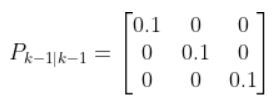
For the first iteration of EKF, we initialize Pk-1|k-1 to some guessed values (e.g. 0.1 along the diagonal part of the matrix and 0s elsewhere).
Fk and FkT
In this case, Fk and its transpose FkT are equivalent to At-1 and ATt-1, respectively, from my state space model tutorial.
Recall from my tutorial on state space modeling that the A matrix (F matrix in Wikipedia notation) is a 3×3 matrix (because there are 3 states in our robotic car example) that describes how the state of the system changes from time k-1 to k when no control (i.e. linear and angular velocity) command is executed.
If we had 5 states in our robotic system, the A matrix would be a 5×5 matrix.
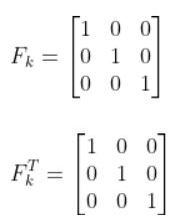
Typically, a robot car only drives when the wheels are turning. Therefore, in our running example, Fk (i.e. A) is just the identity matrix and FTk is the transpose of the identity matrix.
Qk
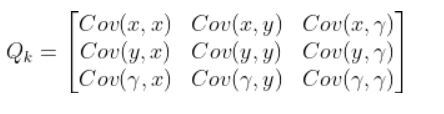
We have one last term in the predicted covariance of the state equation, Qk. Qk is the state model noise covariance matrix. It is also a 3×3 matrix in our running robot car example because there are three states.
In this case, Q is:
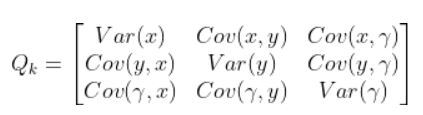
The covariance between two variables that are the same is actually the variance. For example, Cov(x,x) = Variance(x).
Variance measures the deviation from the mean for points in a single dimension (i.e. x values, y values, or yaw angle values).
For example, suppose Var(x) is a really high number. This means that the x values are all over the place. If Var(x) is low, it means that the x values are clustered around the mean.
The Q term is necessary because states have noise (i.e. they aren’t perfect). Q is sometimes called the “action uncertainty matrix”. When you apply control inputs u at time step k-1 for example, you won’t get an exact value for the Predicted State Estimate at time k (as we calculated in Step 2).
Q represents how much the actual motion deviates from your assumed state space model. It is a square matrix that has the same number of rows and columns as there are states.
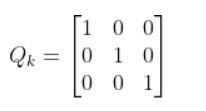
We can start by letting Q be the identity matrix and tweak the values through trial and error.
In our running example, Q could be as follows:
When Q is large, the EKF tracks large changes in the sensor measurements more closely than for smaller Q.
In other words, when Q is large, it means we trust our actual sensor observations more than we trust our predicted sensor measurements from the observation model…more on this later in this tutorial.
Putting the Terms Together
In our running example of the robot car, here would be the equation for the first run through EKF.
This standard form equation:
becomes this after plugging in the values for each of the variables:
4. Innovation or Measurement Residual
In this step, we calculate the difference between actual sensor observations and predicted sensor observations.
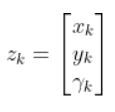
zkis the observation vector. It is a vector of the actual readings from our sensors at time k.
In our running example, suppose that in this case, we have a sensor mounted on our mobile robot that is able to make direct measurements of the three components of the state.
Therefore:
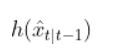
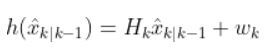
h(x̂k|k-1) is our observation model. It represents the predicted sensor measurements at time k given the predicted state estimate at time k from Step 2. That hat symbol above x means “predicted” or “estimated”.
Recall that the observation model is a mathematical equation that expresses predicted sensor measurements as a function of an estimated state.
is the exact same thing as this (in Wikipedia notation):
We use the:
measurement matrix Hk (which is used to convert the predicted state estimate at time k into predicted sensor measurements at time k),
predicted state estimate x̂k|k-1 that we calculated in Step 2,
and a sensor noise assumption wk (which is a vector with the same number of elements as there are sensor measurements)
to calculate h(x̂k|k-1).
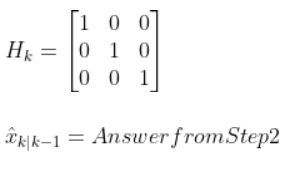
In our running example of the robot car, suppose that in this case, we have a sensor mounted on our mobile robot that is able to make direction measurements of the state [x,y,yaw angle]. In this example, H is the identity matrix. It has the same number of rows as sensor measurements and same number of columns as the number of states) since the state maps 1-to-1 with the sensor measurements.
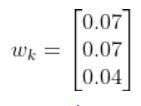
You can find wk by looking at the sensor error which should be on the datasheet that comes with the sensor when you purchase it online or from the store. If you are unsure what to put for the sensor noise, just put some random (low) values.
In our running example, we have a sensor that can directly sense the three states. I’ll set the sensor noise for each of the three measurements as follows:
You now have everything you need to calculate the innovation residual ỹ using this equation:
5. Innovation (or residual) Covariance
In this step, we:
use the predicted covariance of the state estimate Pk|k-1from Step 3
and Rk (sensor measurement noise covariance matrix…which is a covariance matrix that has the same number of rows as sensor measurements and same number of columns as sensor measurements)
to calculate Sk, which represents the measurement residual covariance (also known as measurement prediction covariance).
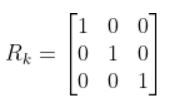
I like to start out by making Rk the identity matrix. You can then tweak it through trial and error.
If we are sure about our sensor measurements, the values along the diagonal of R decrease to zero.
You now have all the values you need to calculate Sk:
6. Near-optimal Kalman Gain
We use:
the Predicted Covariance of the State Estimate from Step 3,
the measurement matrix Hk,
and Sk from Step 5
to calculate the Kalman gain Kk
K indicates how much the state and covariance of the state predictions should be corrected (see Steps 7 and 8 below) as a result of the new actual sensor measurements (zk).
If sensor measurement noise is large, then K approaches 0, and sensor measurements will be mostly ignored.
If prediction noise (using the dynamical model/physics of the system) is large, then K approaches 1, and sensor measurements will dominate the estimate of the state [x,y,yaw angle].
7. Updated State Estimate
In this step, we calculate an updated (corrected) state estimate based on the values from:
Step 2 (predicted state estimate for current time step k),
Step 6 (near-optimal Kalman gain from 6),
and Step 4 (measurement residual).
This step answers the all-important question: What is the state of the robotic system after seeing the new sensor measurement? It is our best estimate for the state of the robotic system at the current timestep k.
8. Updated Covariance of the State Estimate
In this step, we calculate an updated (corrected) covariance of the state estimate based on the values from:
Step 3 (predicted covariance of the state estimate for current time step k),
Step 6 (near-optimal Kalman gain from 6),
measurement matrix Hk.
This step answers the question: What is the covariance of the state of the robotic system after seeing the fresh sensor measurements?
Python Code for the Extended Kalman Filter
Let’s put all we have learned into code. Here is an example Python implementation of the Extended Kalman Filter. The method takes an observation vector zk as its parameter and returns an updated state and covariance estimate.
Let’s assume our robot starts out at the origin (x=0, y=0), and the yaw angle is 0 radians.
We then apply a forward linear velocity v of 4.5 meters per second at time k-1 and an angular velocity ω of 0 radians per second.
At each timestep k, we take a fresh observation (zk).
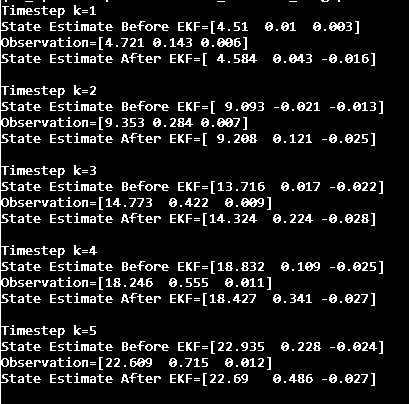
The code below goes through 5 timesteps (i.e. we go from k=1 to k=5). We assume the time interval between each timestep is 1 second (i.e. dk=1).
Here is our series of sensor observations at each of the 5 timesteps…k=1 to k=5 [x,y,yaw angle]:
Oops! Looks like our sensors are indicating that our state space model underpredicted all state values.
This is where the EKF helped us. We use EKF to blend the estimated state value with the sensor data (which we don’t trust 100% but we do trust some) to create a better state estimate of:
The Extended Kalman Filter is a powerful mathematical tool if you:
Have a state space model of how the system behaves,
Have a stream of sensor observations about the system,
Can represent uncertainty in the system (inaccuracies and noise in the state space model and in the sensor data)
You can merge actual sensor observations with predictions to create a good estimate of the state of a robotic system.
That’s it for the EKF. You now know what all those weird mathematical symbols mean, and hopefully the EKF is no longer intimidating to you (it definitely was to me when I first learned about EKFs).
What I’ve provided to you in this tutorial is an EKF for a simple two-wheeled mobile robot, but you can expand the EKF to any system you can appropriately model. In fact, the Extended Kalman Filter was used in the onboard guidance and navigation system for the Apollo spacecraft missions.
Feel free to return to this tutorial any time in the future when you’re confused about the Extended Kalman Filter.
**1、官网**
http://dlib.net/
Dlib is a modern C++ toolkit containing machine learning algorithms and tools for creating complex software in C++ to solve real world problems.
**2、github**
https://github.com/davisking/dlib